

Quick Verdict
This Whop review breaks down pricing, features, and whether it beats running separate creator tools.
Best for: Creators and small teams who want to sell memberships, courses, or community access without stitching together a separate storefront, community platform, and payment processor.
Rating: 8.5/10 Should you buy it? Yes, if you want one bill and one dashboard instead of three. Whop charges only when you sell, so there is no monthly fee to test it against your own numbers.
Check current Whop pricing and start selling →
What Is Whop and Who It’s For
Whop is an all-in-one platform for selling digital products, memberships, and community access: a storefront, a built-in Discord-style community space, and payment processing are bundled into a single product instead of three separate subscriptions.
It’s built for creators, coaches, and small software teams who want to launch a paid community or membership tier without hiring a developer to connect a website builder, a community tool, and a payment gateway.
That focus also means trade-offs. Teams that need deep course-authoring tools (drip modules, certificates, detailed quizzes) may still prefer a dedicated course platform, and larger catalogs with many SKUs can outgrow Whop’s simpler storefront.
This Whop review looks at how Whop actually works, what it costs once fees are included, and how it stacks up against Gumroad and Patreon for a creator deciding where to sell.
How Whop Works
- Create a listing – set up a membership, digital product, or community access pass in a guided flow, with pricing, access rules, and a storefront page generated automatically.
- Members join through checkout – buyers pay by card or supported local payment methods, and access to your community or content unlocks immediately after payment.
- You manage everything from one dashboard – subscriptions, one-time sales, affiliate payouts, and community moderation all live in the same admin panel.
- Affiliates can promote for you – Whop’s built-in affiliate system lets other creators refer buyers and earn a cut automatically, without a separate affiliate tool.
Key Features Compared to a DIY Stack
This part of the Whop review breaks down the features that matter most:
- Storefront + checkout: a hosted sales page and checkout flow, so there’s no separate website builder or shopping cart plugin to maintain.
- Built-in community: a chat-and-channels space similar to Discord, bundled with the membership itself instead of billed as a separate app.
- Payments and payouts: card and ACH processing, plus fast payouts, without connecting a third-party processor.
- Affiliate program tools: recruit and pay affiliates from the same dashboard used to run the membership.
Pricing Overview: What Whop Actually Costs
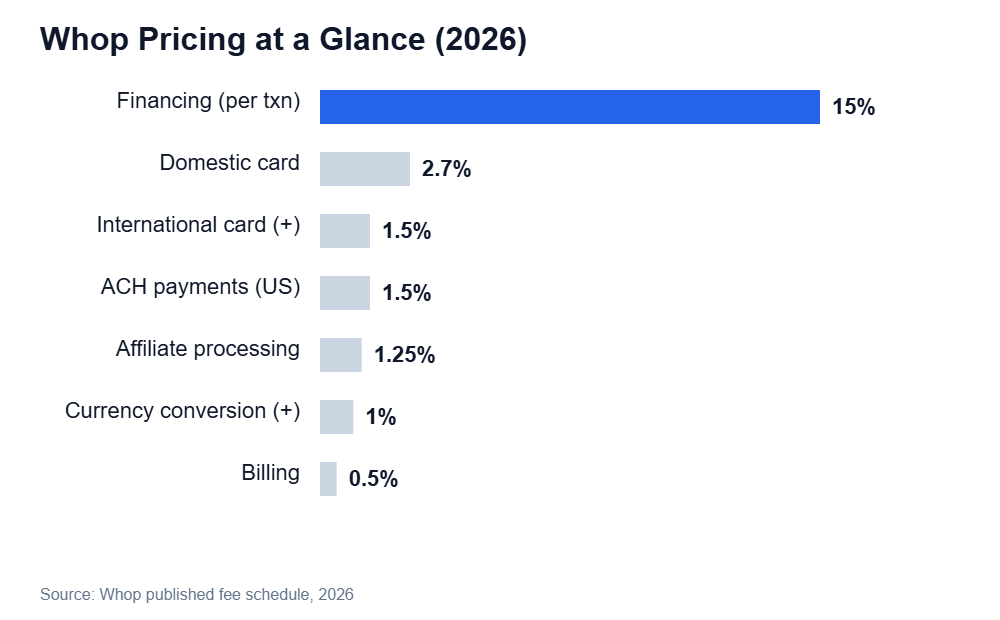
Whop doesn’t charge a monthly platform fee — the cost shows up as a per-transaction rate instead. Domestic card payments run 2.7% plus a small fixed fee, while international cards and currency conversion add on top of that.
Whop’s optional financing feature carries a notably higher 15% rate, and add-ons like affiliate processing and billing add smaller increments.
For a creator running mostly domestic-card memberships, the effective cost stays close to the base 2.7% rate; the total climbs mainly for sellers with heavy international sales or who use financing.
| Fee type | Rate |
|---|---|
| Domestic card | 2.7% + fixed fee |
| International card | +1.5% |
| Currency conversion | +1% |
| ACH payments (US) | 1.5% |
| Financing option | 15% |
See Whop’s full fee schedule →
Whop vs Alternatives: Gumroad and Patreon
This section of the Whop review lines Whop up directly against Gumroad and Patreon.
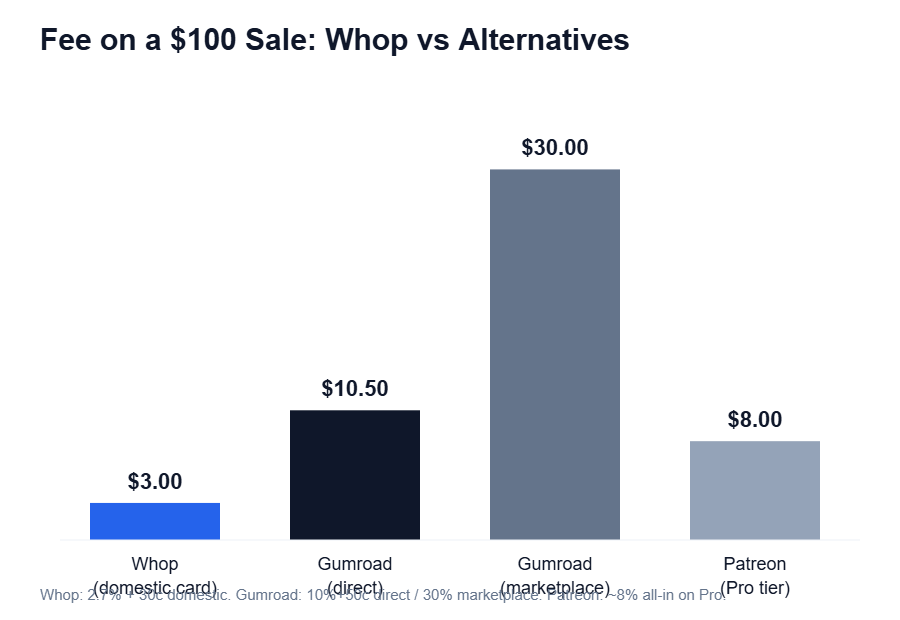
On a $100 domestic sale, Whop’s 2.7% rate works out to about $3 in fees — noticeably lower than Gumroad’s 10% direct rate (about $10.50) and its 30% marketplace-discovery rate.
It’s also lower than Patreon’s roughly 8% all-in cost on its Pro tier.
Gumroad and Patreon both remain strong options if a creator specifically wants Gumroad’s simple digital-download focus or Patreon’s existing audience of subscription-first fans.
Whop’s edge is bundling a community space with the storefront rather than treating them as separate products.
| Feature | Whop | Gumroad | Patreon |
|---|---|---|---|
| Monthly platform fee | None | None | None (tiered % fee) |
| Built-in community | Yes | No | Limited (posts/chat) |
| Typical fee on $100 sale | ~$3.00 | $10.50–$30.00 | ~$8.00 |
| Affiliate program | Built-in | Add-on | Not built-in |
Pros & Cons
A quick recap from this Whop review, side by side:
| Pros | Cons |
|---|---|
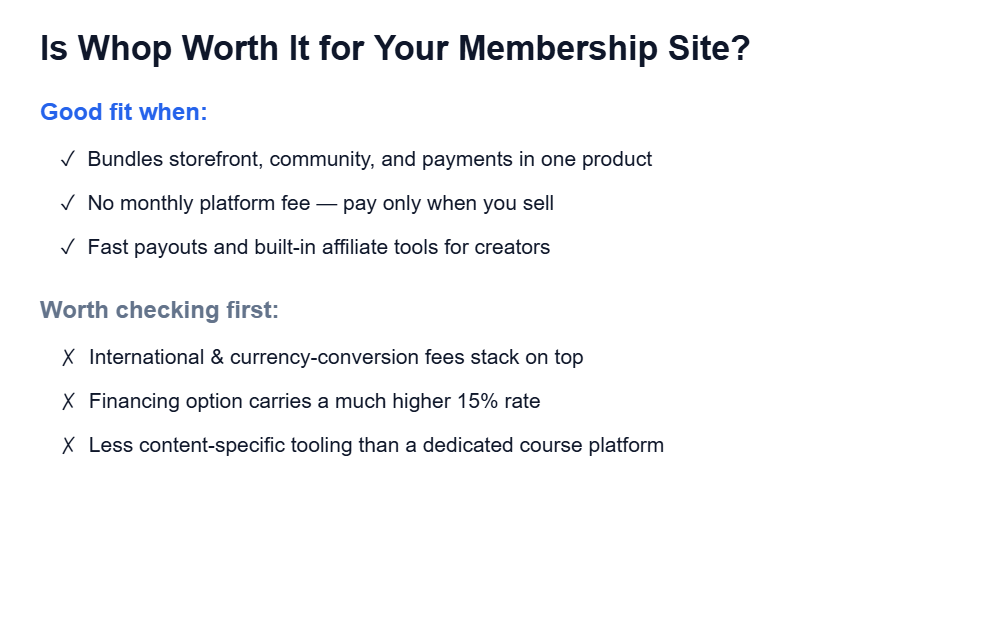
| No monthly fee — pay only when you sell | International and currency-conversion fees stack on top of the base rate |
| Storefront, community, and payments in one dashboard | Financing option’s 15% rate is much higher than card payments |
| Built-in affiliate tools with no separate app needed | Less specialized course-authoring tooling than a dedicated LMS |
Final Verdict
This Whop review comes down to one question: is a single per-sale fee worth trading for a simpler stack?
For creators who want to launch a paid community or membership without managing three separate subscriptions, Whop is a strong, low-risk pick.
There’s no monthly fee to walk away from if it doesn’t work out, and the 2.7% domestic rate is competitive against Gumroad and Patreon.
Teams with heavy international sales or a need for deep course-building features should weigh the extra fees and the narrower feature set before committing. Overall rating: 8.5/10.
Frequently Asked Questions
These quick answers wrap up this Whop review.
Does Whop charge a monthly fee?
No. Whop doesn’t charge a recurring platform fee; it takes a percentage of each sale instead, starting at 2.7% for domestic card payments.
Is Whop better than Gumroad for memberships?
For recurring memberships with a community component, Whop’s bundled community space and generally lower per-sale fees make it a stronger fit than Gumroad, which focuses mainly on one-off digital downloads.
Can I run affiliates on Whop without another tool?
Yes. Whop includes a built-in affiliate system, so creators can recruit and pay affiliates from the same dashboard used to manage the membership.
What’s the most expensive way to get paid on Whop?
Whop’s optional financing feature carries the highest rate at 15% per transaction, well above the standard 2.7% domestic card rate.