


Supercreator sells a CRM layer and an AI layer as separate products on one price list.
How this review was done. This is a desk review. No account was opened, no trial was started and no software was installed. Everything below is read from the company’s own public pages on 23 October 2026 – the pricing page at all four of its earnings bands, the ten CRM feature pages, and the chatter management documentation. Prices were read with the site in English and US dollars.
Most coverage of this product is about the AI that writes messages rather than about Supercreator CRM. That is one half of what is on sale. The other half – the part this review is about – is a management layer: who on your team sent which message, how much each person earned per hour worked, who can log in to which account, and what the audit trail shows. Supercreator CRM is sold as the foundation that the AI sits on top of, and it is free at the bottom tier.
That makes the pricing page the most interesting document on the site, and it contains two things worth doing arithmetic on. The headline rate is not a single number – it moves with how much you earn – and the top tier carries a second charge that does not appear on the price card at all. Both are below, and both can be checked in a browser in under five minutes. The pricing page is the source for every figure quoted here.
What Supercreator CRM is, and where it sits
Supercreator is software for managing OnlyFans accounts, and Supercreator CRM is its record-keeping half, aimed at two audiences the company names itself: solo creators and the agencies that run accounts on behalf of creators. The company states it has 25,000 creators and agencies as customers – its own figure, repeated here as a claim rather than as an audited number.
The product splits cleanly in two, and Supercreator CRM is one half of it. The CRM is the record-keeping and measurement layer: fan records, team permissions, message logs, revenue and marketing analytics, and a desktop app that holds multiple accounts at once. The AI layer sits on top and writes and sends messages. The two are priced separately, and the CRM half is the one that has a genuinely free tier.
For an agency, the Supercreator CRM split matters more than it looks. The measurement layer is what turns a group of freelance chatters into something you can run payroll against. Everything in the sections below comes from that half of the product.
The four Supercreator CRM plans
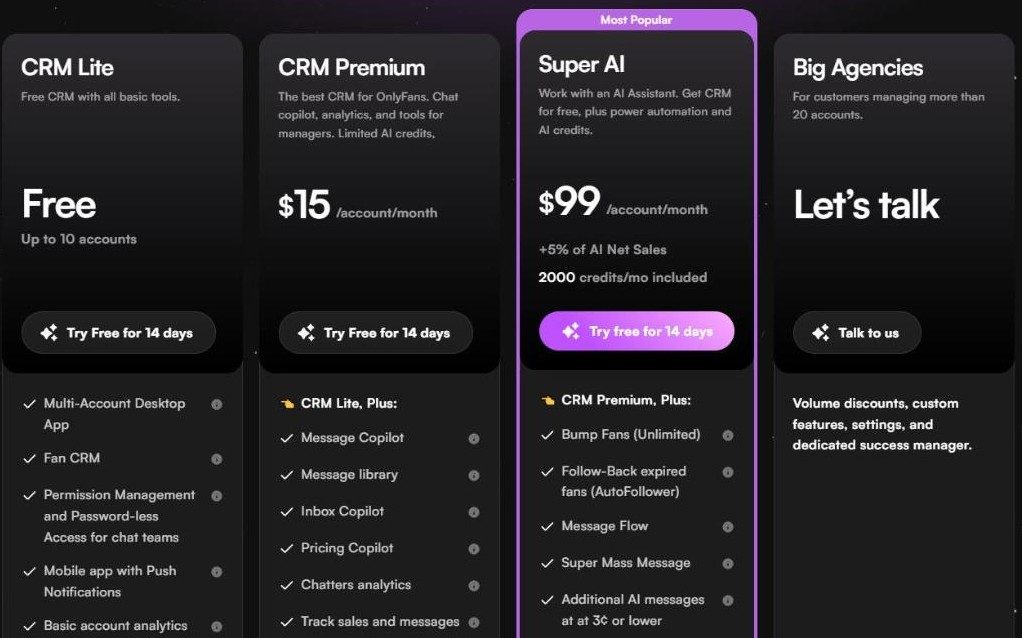
The four plans as shown to an account earning under 1,000 USD a month (screenshot from supercreator.app, 23 October 2026).
Four Supercreator CRM tiers are listed, and the first one costs nothing:
- CRM Lite – free, up to 10 accounts. The multi-account desktop app, Fan CRM, permission management with password-less access, mobile app with push notifications, basic account analytics, emoji keyboard and viral video trend tracking.
- CRM Premium – everything in Lite plus Message Copilot, message library, Inbox Copilot, Pricing Copilot, chatter analytics, sales and message tracking, advanced account analytics, marketing analytics and the full mobile app.
- Super AI – marked Most Popular. Everything in Premium plus Bump Fans, Follow-Back (AutoFollower), Message Flow, Super Mass Message and additional AI messages.
- Big Agencies – no listed price, for customers managing more than 20 accounts. Volume discounts, custom features and a dedicated success manager.
All three paid Supercreator CRM tiers carry a 14-day free trial. The free tier is not a trial – it is a permanent plan with a ten-account ceiling, which is a real entry point rather than a teaser.
Finding one: Supercreator CRM pricing goes up with your earnings, not down
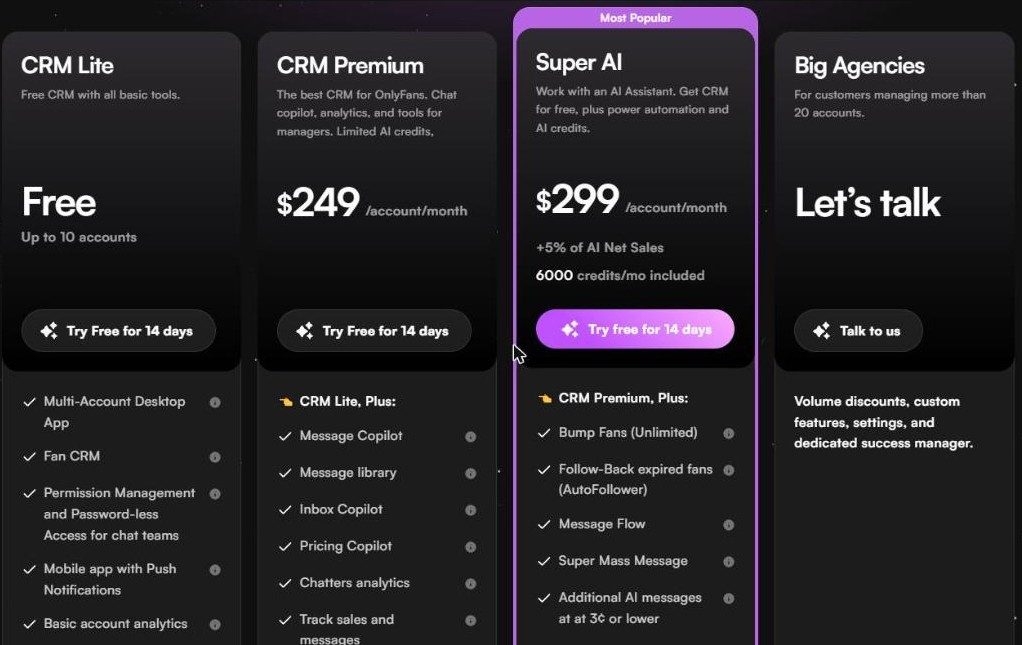
The same four plans shown to an account earning over 25,000 USD a month (screenshot from supercreator.app, 23 October 2026).
The Supercreator CRM pricing page opens with a slider and the line “Pricing adjust to your earnings – Slide to view rates.” There are four bands: under 1,000 USD a month, 1,000 to 15,000, 15,000 to 25,000, and 25,000 and above. The phrasing is neutral, and most readers would assume volume means a discount. It is the other way round.
| Plan | Earning under 1,000 USD/mo | Earning over 25,000 USD/mo | Change |
| CRM Lite | Free | Free | unchanged |
| CRM Premium | 15 USD per account/month | 249 USD per account/month | 16.6x |
| Super AI | 99 USD per account/month | 299 USD per account/month | 3x |
| Super AI credits included | 2,000 per month | 6,000 per month | 3x |
| Big Agencies | Let us talk | Let us talk | – |
The Supercreator CRM jump on CRM Premium is the one to notice: from 15 USD to 249 USD per account per month for the same feature list. Read as a share of revenue it is still small – 249 USD against 25,000 USD of monthly earnings is under one percent, where 15 USD against 1,000 USD is one and a half percent – so the model is arguably gentler at the top than at the bottom. But the sticker price a reader sees first is the one for the smallest accounts, and nothing on the page says so in words.
The practical consequence: the advertised “plans start from as low as 15 USD a month” is accurate and is also the floor of a ladder. Anyone budgeting Supercreator CRM for a growing account should move the slider to the band they expect to be in next year, not the one they are in today.
Finding two: the second charge that is not on the price card
Under the Super AI price, in smaller type, sit two lines that change the total: “+5% of AI Net Sales” and “2000 credits/mo included” (6,000 at the top band). The percentage is a revenue share, charged on top of the per-account monthly fee.
Work it through on the company’s own band definitions. An account in the top band earning 25,000 USD a month, with the AI responsible for the sales, pays 299 USD for the seat plus 5 percent of those AI net sales. Five percent of 25,000 USD is 1,250 USD – roughly four times the seat price, and a number that appears nowhere on the price card.
The credits are the third Supercreator CRM cost component. The plan includes a fixed monthly allowance, and beyond it the page lists additional AI messages at 3 cents or lower. A top-band account that burns its 6,000 included credits and sends another 6,000 adds about 180 USD. None of this is concealed – every figure is printed on the page – but a buyer who reads only the large type will plan for 299 USD and meet a bill several times that.
This matters less for the CRM half, which is the point of this review: CRM Lite and CRM Premium carry no revenue share and no credit meter. The flat per-account fee is the whole bill. For an agency that wants measurement without automation, that is the cleaner of the two pricing models on offer.
What Supercreator CRM includes before you pay anything
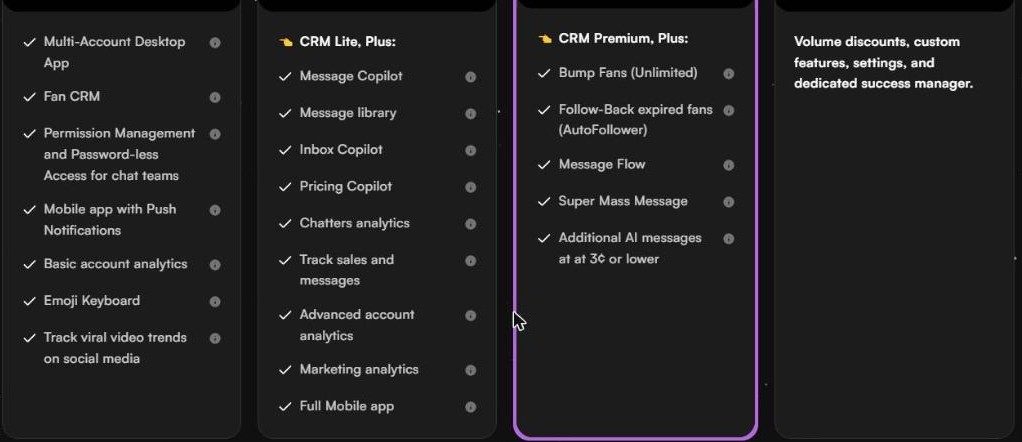
The published feature split between the free and paid CRM tiers (screenshot from supercreator.app, 23 October 2026).
The free Supercreator CRM tier is unusually complete for this category. The multi-account desktop app holds several accounts at once and switches between them without logging out, with desktop push notifications for sales and messages. The Fan CRM records information about fans automatically from chats, which the company describes as AI-powered documentation rather than manual note-taking.
The piece that matters most for a team is in the free Supercreator CRM tier too: permission management with password-less access. Team members work on accounts without being given the account password, with custom roles and scoped permissions. For an agency, not circulating credentials is a security improvement that normally costs money elsewhere.
Paid CRM adds the measurement layer – chatter analytics, sales and message tracking, advanced account analytics, marketing analytics – plus four Copilot tools that suggest messages and prices rather than sending them. The split is coherent: free gives you control, paid gives you numbers.
What Supercreator CRM measures about each person on the team
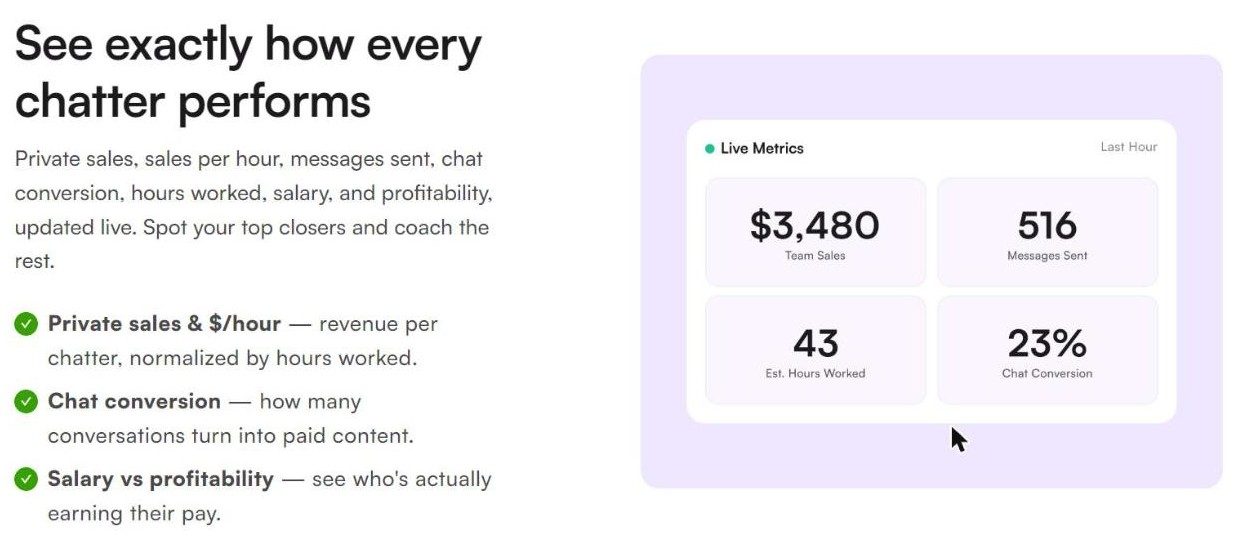
The per-chatter metrics as the product page describes them (screenshot from supercreator.app, 23 October 2026).
This is the most specific Supercreator CRM documentation on the site. For every chatter, the product tracks private sales, sales per hour, messages sent, chat conversion, hours worked, salary and profitability – updated live. Three of those are defined explicitly on the page:
- Private sales and dollars per hour – revenue per chatter, normalised by hours worked.
- Chat conversion – how many conversations turn into paid content.
- Salary versus profitability – in the company’s words, see who is actually earning their pay.
Normalising revenue by hours worked is the Supercreator CRM detail that makes the rest useful. Raw sales totals reward whoever happens to cover the busiest shift; revenue per hour does not. Pairing that with a salary figure turns the dashboard into a margin calculation per employee, which is what an agency owner is actually trying to work out.
The message log, and what it is for
Every message in Supercreator CRM is searchable and exportable. The log filters across creators, team members, categories, direction and type, with a date range and an option to hide unsent messages, and the whole thing downloads as CSV or PDF. The company names three uses: payroll, audits and creator reports.
Those three uses explain the Supercreator CRM design. Payroll needs per-person totals over a pay period. Audits need the ability to reconstruct who did what. Creator reports need a defensible number to hand to the person whose account is being managed – the one part of this that protects the creator rather than the agency.
An export in two formats is a small thing that signals something larger: the data is meant to leave the system. Tools that only show numbers on a dashboard are harder to leave. The CRM pages describe the full filter set.
Access control and the audit trail
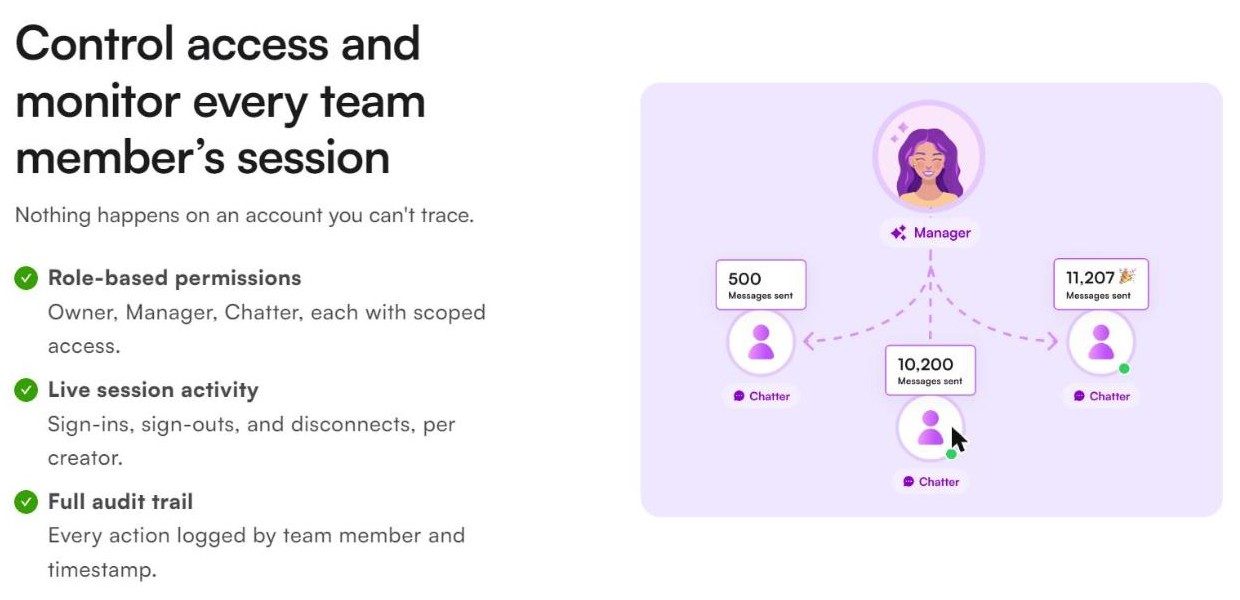
Role-based permissions and session logging, as published (screenshot from supercreator.app, 23 October 2026).
The Supercreator CRM access model is three roles – Owner, Manager, Chatter – each with scoped access, plus assignment of specific creators to specific team members. On top of that sits live session activity (sign-ins, sign-outs and disconnects, per creator) and a full audit trail logging every action by team member and timestamp. The page sums it up as: nothing happens on an account you cannot trace.
Combined with password-less access, this is the strongest argument for Supercreator CRM for the CRM half of the product. The alternative most small agencies run on is a shared password in a group chat, which cannot be revoked for one person, cannot be scoped, and leaves no record. Replacing that is a concrete improvement regardless of whether the AI features are ever switched on.
This is also workforce monitoring software
It is worth stating plainly what the previous two Supercreator CRM sections add up to, because the product pages frame it only as a management benefit. A system that records every message a worker sends, their hours, their conversion rate, their salary and their sign-in times is employee monitoring, and in most jurisdictions that carries obligations to the people being monitored.
What those obligations are depends on where the team sits, and chat teams in this industry are frequently distributed across several countries. The UK regulator publishes a plain-English guide to the subject in its guidance on monitoring workers, which sets out the tests an employer is expected to apply before deploying this kind of tooling. It is a useful baseline even outside the UK, because the questions it asks – is the monitoring proportionate, have workers been told, is there a less intrusive option – are the same questions most regimes ask.
None of this is a criticism of the software, which does what it says and does it clearly. It is a note that buying Supercreator CRM puts a compliance question on the buyer’s desk that did not exist when the team was running on a spreadsheet.
Account and marketing analytics
Two further Supercreator CRM analytics layers are listed on the paid tier. Account analytics covers revenue by channel – chat, mass messages, subscriptions and so on – plus the busiest times of day and the top-selling content. That is the information needed to decide when to staff shifts and what to produce more of.
Marketing analytics is the acquisition side: new subscriber trends, page conversion rates, average fan spending expressed as lifetime value, and sales attributed to tracking links and campaigns, with ROI and customer acquisition cost calculated from them. Tracking-link attribution is the part that is hard to build yourself and the part that makes paid promotion measurable.
Both sit behind the paid CRM tier rather than the AI tier, which is consistent with the split this review has described throughout: Supercreator CRM is sold as the measurement product, and the AI is sold as a separate thing on top of it.
Where the AI fits, stated plainly
The AI layer sits outside Supercreator CRM and is not the subject of this review, but it should be described accurately rather than skipped. Supercreator’s AI writes and sends messages to fans on the account holder’s behalf. That is the function: the fan is talking to software, and the product exists because doing it by hand at scale is expensive.
The company publishes controls around it – guardrails and restricted words, real-time monitoring, a conversation qualifier, automation rules and language translation – and the Copilot tools on the CRM tier suggest rather than send, leaving a person in the loop. Whether using the fully automatic mode is appropriate is a decision for the account holder and depends on what they have told their audience; this review takes no position on it and does not treat it as a selling point.
What is relevant to Supercreator CRM is simply that the two are separable. The free and Premium CRM tiers do not include the automatic AI chatter, so a team can buy the measurement and access control without buying the automation.
Who Supercreator CRM suits
Supercreator CRM suits a small agency currently running on shared passwords and a spreadsheet. The free tier alone replaces both, and ten accounts is enough headroom for most teams at that stage. It suits an owner who needs to pay chatters on measured output rather than claimed hours, because the per-person numbers and the CSV export are built for exactly that.
Supercreator CRM suits a solo creator less obviously, since one person does not need role-based permissions or chatter analytics – though the free desktop app and fan records cost nothing to try. The free tier requires no payment details to evaluate the CRM half.
It is a weaker fit for a team that expects a flat software bill, because the per-account rate moves with earnings and the AI tier adds a revenue share on top. It is a weaker fit for anyone operating under strict worker-monitoring rules who has not yet done that groundwork. And it is a weaker fit for an operation above 20 accounts that wants a published price, since that bracket is quoted individually.
How this review of Supercreator CRM was done
Every figure above was read from the company’s own published pages on 23 October 2026: the pricing page at both its lowest and highest earnings bands, the CRM overview, the chatter management page and the related CRM feature pages. The two intermediate earnings bands exist on the slider but were not separately recorded; the figures quoted are the two endpoints.
No account was created, no trial was started and no software was installed, so nothing here is a measurement of how the product performs in use. Where this review says Supercreator CRM does something, it means the company states that it does. The two findings are arithmetic performed on published numbers and are reproducible by any reader who moves the slider. Screenshots are unedited captures of those pages, cropped to the relevant block; the dashboard figures they contain are the vendor’s own illustrative mock-ups, not real account data.
The short version
Supercreator CRM is a management layer with a genuinely free tier, three-role access control, password-less team access, a full audit trail, per-chatter revenue-per-hour and salary-versus-profitability reporting, and a message log that exports to CSV and PDF. For an agency replacing shared passwords and manual bookkeeping, the free plan does real work before any money changes hands.
Against that, the Supercreator CRM per-account rate climbs steeply with the earnings band – CRM Premium runs 15 USD at the bottom and 249 USD at the top – the AI tier adds 5 percent of AI net sales plus metered credits on top of its seat price, the top bracket is quote-only, and the measurement features bring a worker-monitoring obligation along with them. All four are visible on public pages.
Overall: 8.4 / 10. Clear Supercreator CRM documentation, an unusually capable free tier and the best published per-employee reporting in its category, marked down for a pricing ladder whose headline number only applies to the smallest accounts. Current rates at every band are on the Supercreator CRM pricing page.