


Vectorizer AI pricing is unusually easy to understand once you notice that there are really only two products behind it: one flat monthly plan for people who work in a browser, and a ladder of credit bundles for software that converts images on its own. Everything else is detail. This review lays out every published Vectorizer AI pricing number, works out what a credit actually costs you at each tier, and points out the one comparison the pricing page never puts side by side.
All Vectorizer AI pricing figures below were read from the public pricing page on 22 October 2026 with the currency switcher set to US dollars. No account was bought and nothing here is a quote: prices on a product like this move, so confirm the live number before you subscribe.
What Vectorizer AI pricing actually covers

Vectorizer.AI converts raster images into vector artwork. It takes PNG, JPG, GIF, BMP and WebP in, and gives you SVG, EPS, DXF and PDF out, with PNG also available on the API side. Every Vectorizer AI pricing plan covers the same conversion engine and the same formats, which matters more than it sounds: the Vectorizer AI pricing tiers do not hold features back from cheaper customers. You are buying access and volume, not capability.
That is worth stating plainly because many tools in this category reserve the good output formats for the expensive tier. Here, DXF for CAD and CNC work and EPS for print are available to a nine-dollar subscriber and to a five-thousand-dollar-a-month API customer alike.
The two halves of Vectorizer AI pricing
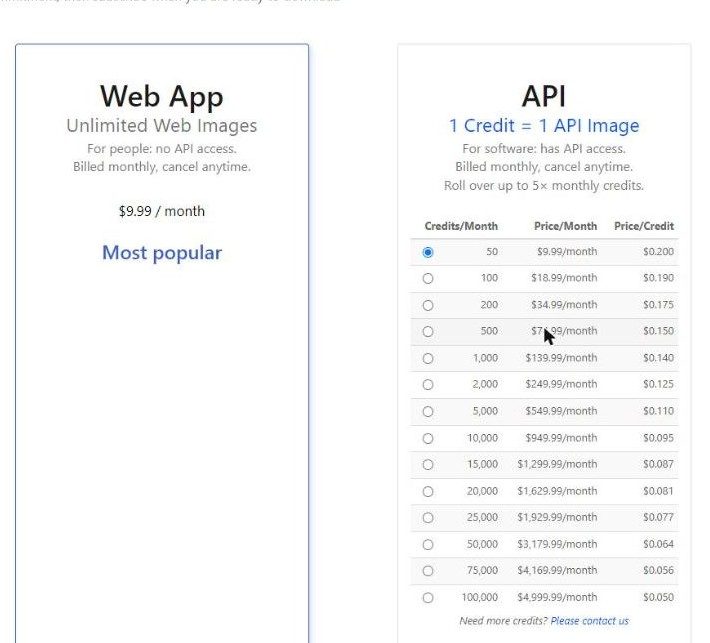
The Vectorizer AI pricing page splits into a Web App column and an API column, and the company describes the split in terms of who is doing the work. The Web App is for a person who uploads an image, looks at the preview, adjusts the export options and downloads the file. The API is for software that converts images with no human in the loop.
Web App: 9.99 US dollars a month, unlimited web images, no API access, billed monthly, cancel anytime. There is no image cap published anywhere on that plan. The company itself labels it “Most popular” and says in its own FAQ that for most users the unlimited Web App plan is the best choice.
API: usage-based, where one credit equals one API image. Plans are billed monthly, cancel anytime, and unused credits roll over up to five times your monthly allowance. The live Vectorizer AI pricing page lists both columns together so you can compare them before committing to either.
The full Vectorizer AI pricing ladder for API credits
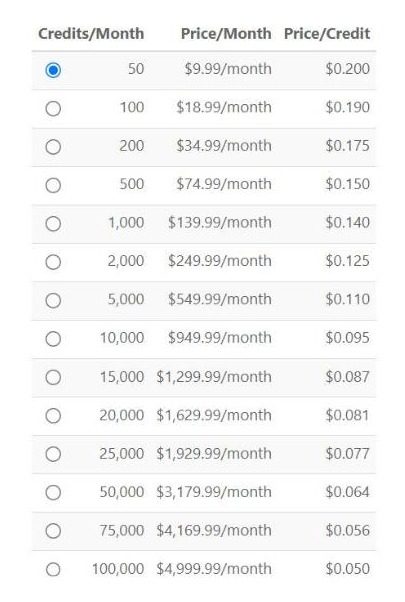
Fifteen Vectorizer AI pricing tiers are published, and the company prints the per-credit price itself rather than making you divide. Here is the whole ladder.
| Credits per month | Price per month | Price per credit |
| 50 | 9.99 USD | 0.200 USD |
| 100 | 18.99 USD | 0.190 USD |
| 200 | 34.99 USD | 0.175 USD |
| 500 | 74.99 USD | 0.150 USD |
| 1,000 | 139.99 USD | 0.140 USD |
| 2,000 | 249.99 USD | 0.125 USD |
| 5,000 | 549.99 USD | 0.110 USD |
| 10,000 | 949.99 USD | 0.095 USD |
| 15,000 | 1,299.99 USD | 0.087 USD |
| 20,000 | 1,629.99 USD | 0.081 USD |
| 25,000 | 1,929.99 USD | 0.077 USD |
| 50,000 | 3,179.99 USD | 0.064 USD |
| 75,000 | 4,169.99 USD | 0.056 USD |
| 100,000 | 4,999.99 USD | 0.050 USD |
Above 100,000 credits Vectorizer AI pricing stops publishing numbers and asks you to get in touch, which is the normal pattern for enterprise volume.
What a credit really costs at each Vectorizer AI pricing step
The headline fact buried in the Vectorizer AI pricing table is the spread. A credit costs 0.200 US dollars at the smallest tier and 0.050 US dollars at the largest. That is a four-fold difference in unit price for exactly the same conversion, and it is the single most useful thing to know about Vectorizer AI pricing before you choose a plan.
The Vectorizer AI pricing discount does not arrive smoothly, either. Going from 50 to 100 credits only moves the unit price from 0.200 to 0.190, a five per cent saving for double the commitment. The real steps come later: 500 credits brings it to 0.150, 5,000 brings it to 0.110, and 50,000 brings it to 0.064. If you are close to one of those thresholds, the next tier up can cost barely more in total while cutting your unit price noticeably.
A worked example makes the point. At 1,000 credits a month you pay 139.99 dollars. At 2,000 credits you pay 249.99 dollars, which is 110 dollars more for a second thousand images, so that second thousand effectively costs 0.110 each rather than 0.140. Doing that arithmetic against the Vectorizer AI pricing table before you subscribe is the difference between buying volume well and buying it badly.
The Vectorizer AI pricing comparison the page never makes
Here is the finding that took the longest to spot, and the company does not draw attention to it anywhere.
The unlimited Web App plan and the smallest API plan both cost exactly 9.99 US dollars a month. One gives you unlimited images through the browser. The other gives you fifty images a month through the API. Same price, same engine, same output formats.
That is not a trick, and it is not unfair: you are paying for automation in one case and for volume in the other, and a human sitting at a browser cannot be slotted into someone else’s software pipeline. But it does mean one thing for anyone comparing Vectorizer AI pricing plans. If you do not actually need programmatic access, the API tier is the wrong purchase at any volume, and the fifty-credit plan in particular buys you fifty images for the price of an unlimited account.
The reverse is also worth saying. If your software has to convert images without a person involved, no amount of Web App subscription will do it, because that plan explicitly has no API access. Check which column your workflow sits in before you subscribe rather than after.
Rollover, and how it changes your Vectorizer AI pricing tier
Every API plan in the Vectorizer AI pricing ladder rolls unused credits forward up to five times your monthly allowance. On a 1,000-credit plan that means you can bank up to 5,000 credits before anything expires.
This is more generous than it first appears and it changes how to read the whole Vectorizer AI pricing ladder. Because spikes can be absorbed from the bank, you can size a plan to your average monthly volume rather than your busiest month. The company gives exactly this advice in its own FAQ and recommends starting with the smallest plan that fits current needs and upgrading only as usage requires, which is an unusually un-pushy thing for a pricing page to say.
The practical consequence: a studio converting 800 images in a quiet month and 1,800 in a busy one does not need the 2,000-credit tier. The 1,000-credit tier plus rollover covers it, at 110 dollars a month less.
What Vectorizer AI pricing gives you free before you pay
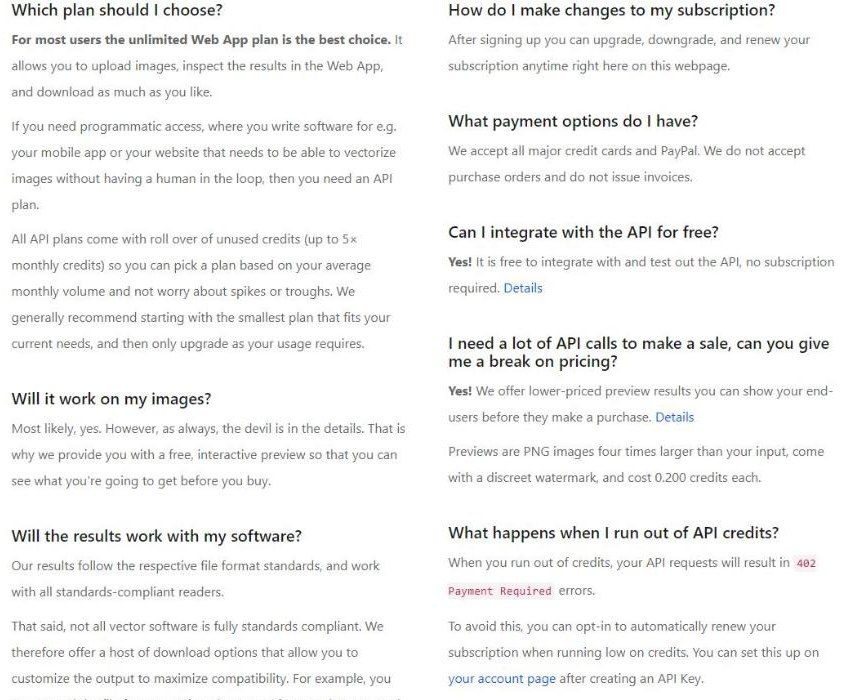
Two parts of Vectorizer AI pricing are free, and both reduce the risk of buying the wrong thing.
The Web App preview is free and unlimited. You can upload images, run the conversion and inspect the result in the browser without a subscription. You pay when you want to download a production file. The company frames this as the answer to “will it work on my images” and the honest answer is that you can find out yourself at no cost. You can also download the finished result of any of their example images for free to test compatibility with your own software before buying.
Integrating with the API is free to test. The FAQ states plainly that it is free to integrate with and test out the API with no subscription required. For a developer evaluating whether the output is good enough, that removes the usual chicken-and-egg problem of paying before you know.
There is a paid-but-cheaper middle option too. Preview results through the API cost 0.200 credits each, come back as PNG images four times larger than your input, and carry a discreet watermark. They exist so you can show an end-user what they would get before they commit to a purchase. Note the arithmetic: on the 50-credit tier a preview costs the same as a fifth of a full image, but five previews equal one full conversion, so a high-preview workflow needs sizing accordingly.
Vectorizer AI pricing billing details worth knowing
A few smaller points from the Vectorizer AI pricing FAQ that matter to business buyers.
Payment is by all major credit cards and PayPal. The company states that it does not accept purchase orders and does not issue invoices, which is a genuine blocker for some procurement departments and is better discovered now than at the end of a finance approval cycle.
You can upgrade, downgrade and renew the subscription yourself from the pricing page after signing up. If an API plan runs out of credits mid-month, requests return a 402 Payment Required error rather than silently failing or auto-charging, and you can opt in to automatic renewal when credits run low from the account page once an API key exists.
Where the credits get spent: three integration paths
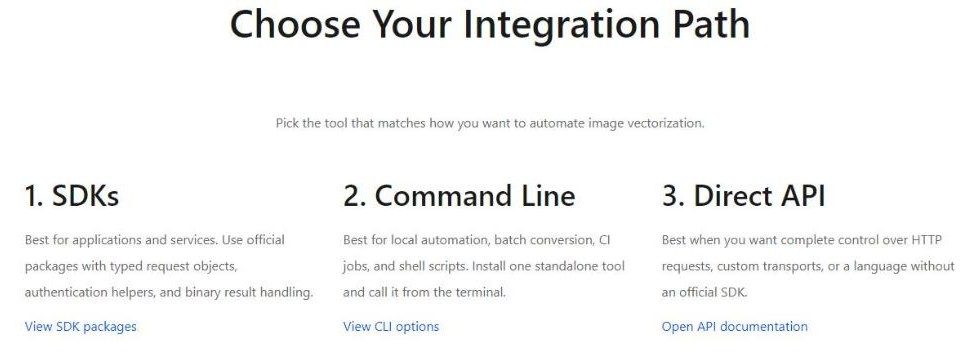
All three developer routes draw on the same credit balance, so the Vectorizer AI pricing you choose does not depend on which one you use. The SDKs are the suggested path for applications and services, with typed request objects and authentication helpers. The command-line tool suits local automation, batch conversion, CI jobs and shell scripts. The direct HTTP API is there when you want full control or work in a language without an official SDK, and an OpenAPI description is published for generated clients.
For a one-off bulk job the CLI is usually the cheapest route in effort terms, since a batch of a few hundred images becomes a shell loop rather than an afternoon of integration work.
Output quality and standards compliance
Vectorizer AI pricing only means something if the output is usable, so two technical points belong here. The engine fits whole geometric shapes where it can, including parameterised circles, ellipses, rounded rectangles and stars with optional rounded corners and arbitrary rotation, rather than approximating everything with cubic Bezier curves. It also supports straight lines, circular and elliptical arcs, and quadratic as well as cubic Beziers.
On compatibility, the company says its output follows the respective file format standards and works with all standards-compliant readers, while acknowledging that not all vector software is fully standards compliant. It therefore exposes download options that let you control the file format version and the curve types used. If you want to understand what standards-compliant actually means for the SVG files you will be handing to a printer or a plotter, the W3C publishes the SVG 2 specification in full, and the download options map onto choices described there.
Who is behind it
Vectorizer.AI is operated by Cedar Lake Ventures, Inc., a small company based in the Minneapolis area that develops and runs a portfolio of websites, web tools and APIs. The two people named on the about page are James Diebel, who holds a doctorate in Aeronautics and Astronautics from Stanford and who started the research project that became Vector Magic, and Jacob Norda, who holds a master’s in Electrical Engineering and Applied Physics from Linkoping.
That lineage is the most reassuring thing behind the Vectorizer AI pricing page. Vector Magic was the company’s first website, which means the same team has been working on automatic vectorisation since a Stanford research project rather than having bolted an AI label onto a generic converter last year.
Which Vectorizer AI pricing plan fits which user
For designers, illustrators and small studios where a person is always in the loop, the Vectorizer AI pricing answer is simple, the 9.99-dollar Web App plan, and the API ladder is a distraction. Unlimited downloads for the price of a sandwich is the whole pitch, and the free preview means you can confirm quality before any money changes hands.
For a developer adding vectorisation to an app or a website, start at the tier that matches your average monthly volume, not your peak, and let rollover absorb the spikes. Test the integration for free first. Open an account and run the free preview on your own images before picking a number.
For print, embroidery, CNC and laser-cutting shops, the thing to check is not price but output: run several of your actual job files through the free preview and open the DXF or EPS in the software you really use. The Vectorizer AI pricing is low enough that quality, not cost, should decide this one.
It fits less well if your finance team requires invoices or purchase orders, and the company says clearly that it offers neither.
How this Vectorizer AI pricing review was done
This is a desk review. Every price, tier and policy above was read from the public Vectorizer.AI pricing, developer and about pages in a browser on 22 October 2026, with no account created and no subscription purchased. The currency switcher was set to US dollars before any figure was recorded, because the site prices in local currency by default and a reader in another country will see different numbers on the same page.
No performance claim is made and no conversion quality was tested, since testing output properly means running your own files through the free preview rather than taking anyone else’s word for it. Per-credit comparisons and the step-change arithmetic are this review’s own calculations from the published table, and anyone can check them in a minute. Prices on a product like this change without notice, so confirm the current figure at the live Vectorizer AI pricing page before you subscribe.
The short version
Vectorizer AI pricing is honest, legible and cheap at the entry point. One flat 9.99-dollar plan with unlimited browser downloads covers most individual users completely, every plan gets the same formats and the same engine, and the free unlimited preview means you can prove the output works on your files before paying anything.
The Vectorizer AI pricing details to work out for yourself are on the API side: the per-credit price drops four-fold across the ladder, the discount arrives in steps rather than smoothly, rollover of up to five times your monthly credits means you should size to your average rather than your peak, and the smallest API tier costs the same as the unlimited Web App plan while giving you fifty images. Add no invoices and no purchase orders for business buyers, and you have the full picture.
Overall: 8.6 / 10